We have not written about Raymarine’s LightHouse 5 (LH5, “V5”) until now, and with 5.0.127 landing this month it is time to put the whole story in one place. The short version: LH5 is a genuine step forward for Axiom 2 owners, but it comes with a compatibility problem that could cost you real money if you are adding a new display to an older system, or replacing a failed one.
Three things in this article are different from our usual software write-up, so we want to be clear about which is which. Raymarine’s own statements are quoted and attributed. Our opinion is labelled as opinion. And one section, “What we’ve seen on LH4.11”, is our own first-hand observation on the water, not a Raymarine statement. We have kept those apart on purpose.
We are VERY disappointed in Raymarine’s stance towards “co-existence” on the network. It is a stomach punch, harder than anything we have ever seen before, in the entire marine industry. Worst is – it is by Raymarine’s CHOICE and not by actual technical limits. If Raymarine tell you any different they are being “coy” with the truth. This is nothing but a “we want to sell more NEW Axiom 2’s” strategy. If not, the displays would have been able to co-exist on the same network and still share data and maps.
We are now considering removing ALL Raymarine from our now 2 test-boats. That is 2 x Axiom 2 Pro 12”, 3 x Axiom+ 9” and 1x Axiom 7” + 3 x Alpha 9 Displays, 3 autopilots (1 boat has dual), radars, wind sensors and depth sensors. It seems we are back to the “suits in charge” with Raymarine – where the last 10-12 years we had REAL progress and customer focus. Now it is pure and simple “bottom line” speculation – probably from a single-minded newly minted MBA graduate. Problem is Navico still has lots of issues with their new Android platform – so Simrad/B&G is not an option. So Furuno XL?
Already running a mixed Axiom 2 + Axiom/Axiom+ system? Read this first
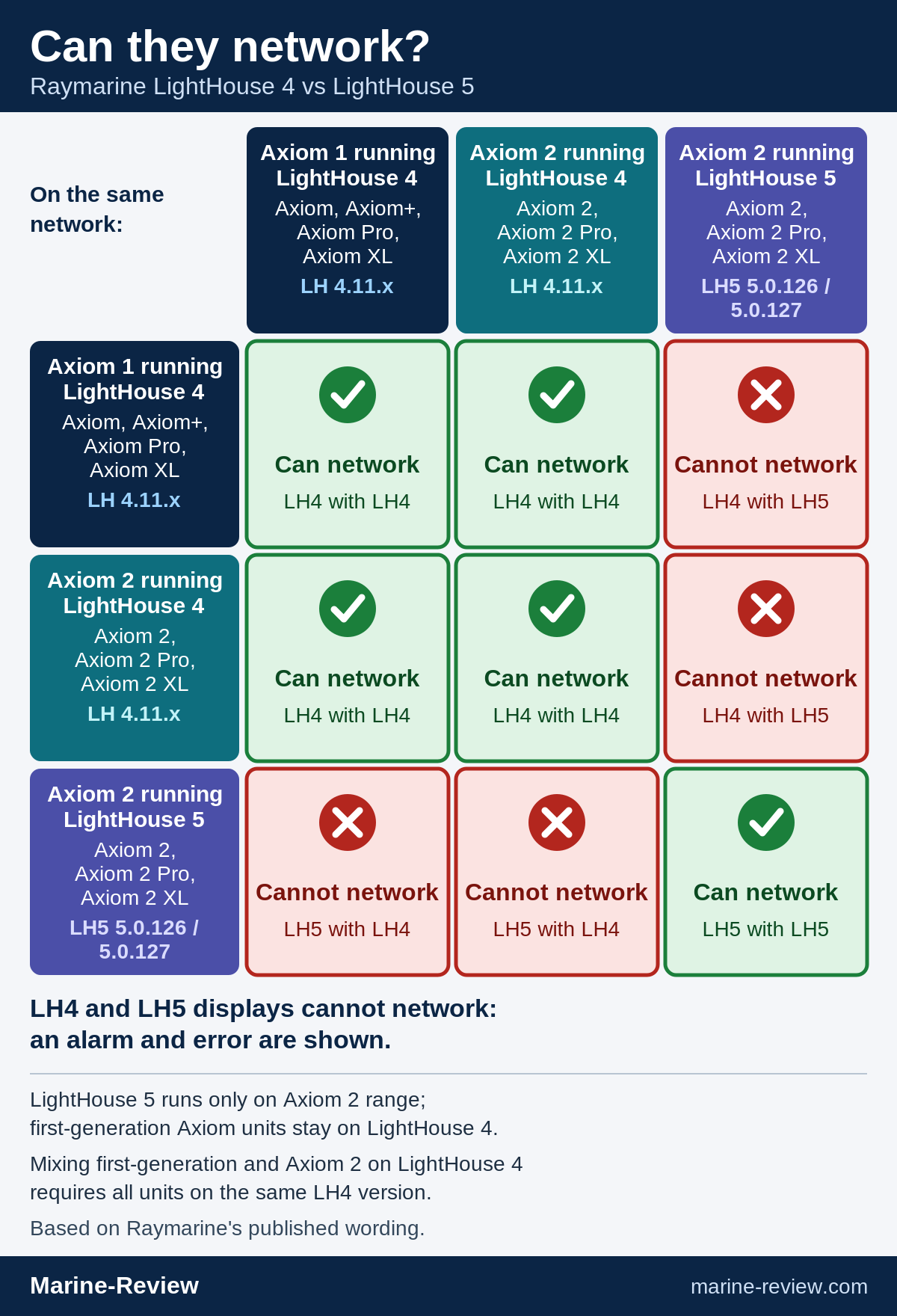
What Raymarine says (official): displays running LightHouse 4 and displays running LightHouse 5 “cannot network” with each other. If incompatible displays are detected, “an alarm and error message will appear”, and Raymarine’s remedy is to “disconnect the incompatible display, power it off, or replace it with a compatible model.” Raymarine’s compatibility notice adds that first-generation Axiom, Axiom Pro, Axiom+ and Axiom XL displays “cannot network with systems containing Axiom 2, Axiom 2 Pro, or Axiom 2 XL displays running LightHouse 5 software.”
Our opinion (not Raymarine’s advice): if your system already mixes Axiom 2-series units with Axiom, Axiom+ or first-generation Pro/XL units and it works today, we would hold the Axiom 2 units on the current LightHouse 4.11 release (4.11.133) and not update them to LH5. That keeps every display on the same LH4 version, which is the arrangement Raymarine says allows a mixed system to network. One update on one display is enough to break the network.
What we could not verify:
- We could not verify what software version new Axiom 2 units ship with, so a new unit might arrive already on LH5. Check before you connect it to your network.
- We found no documented LH5-to-LH4 downgrade procedure. Raymarine still offers an LH4 file for Axiom 2-series displays, but we have not verified that it can be used to go back, and we are not going to tell you it can. Treat an LH5 update as one-way until Raymarine says otherwise.
What LightHouse 5 is, and who gets it
LightHouse 5 is the new operating system for the second-generation, six-core Axiom range only: Axiom 2, Axiom 2 Pro and Axiom 2 XL. Raymarine’s own download page says LH5 “is designed exclusively” for those three, and “is not compatible with first-generation Axiom, Axiom+, Axiom Pro, or Axiom XL chart-plotters. These products should continue to use the latest version of LightHouse 4.”
The background: Raymarine announced the new Axiom 2 (7-, 9- and 12-inch) on 24 March 2026 with a six-core processor, gigabit networking and LightHouse Charts Gen 2. Its LightHouse 4 documentation had already said that LightHouse 4.11 was the last major LH4 release and that new features would arrive in “the upcoming LightHouse 5”. The first-generation units are described as limited to LH4 “due to processor and memory limitations”. LH4 still gets maintenance and security updates, but no new features.
The warning every owner needs to read
This is the part we would print out and tape to the helm. Raymarine’s download page says:
“Displays running LightHouse 4 cannot network with displays running LightHouse 5. If incompatible displays are detected, an alarm and error message will appear. To restore normal operation, disconnect the incompatible display, power it off, or replace it with a compatible model.”
Raymarine’s compatibility notice goes further: first-generation Axiom, Axiom Pro, Axiom+ and Axiom XL displays “cannot network with systems containing Axiom 2, Axiom 2 Pro, or Axiom 2 XL displays running LightHouse 5 software”, and “to move to LightHouse 5, first-generation Axiom-Series displays must be replaced with their Axiom 2-Series equivalents.”
In plain English: an Axiom 2 on LH5 and an Axiom/Axiom+ on LH4 will not work together on one network. Not “reduced features” — the system alarms and tells you to disconnect one of them.
Our opinion: if you have an Axiom, Axiom+ or first-generation Pro/XL and you are tempted to add one Axiom 2 as a second display, stop and do the sums first. You have two sane choices:
- Stay on LightHouse 4.11 across the board. Raymarine says a mixed first-gen/Axiom 2 vessel can network only when every display runs the same LH4 version, and recommends the latest 4.11 (currently 4.11.133). You get the new hardware but none of the LH5 features.
- Replace every first-gen display with its Axiom 2 equivalent and go to LH5 together.
What you must not do is bolt an Axiom 2 onto the network and tap “update” because a pop-up invited you to. Raymarine has documented the rule clearly, but we would like to see it far more prominent where people actually buy, particularly for those who bought an Axiom+ recently (Panbo raised the same concern about recent Axiom+ buyers in April). It is also worth checking what software a new display arrives with before it goes anywhere near your network — we could not verify what version new stock ships with. See “Replacing a single display” below for what that means if you are replacing one unit.
Replacing a single display
This is the situation we think catches people out, so it deserves its own section. A display on a mixed system fails, or is damaged, or is simply upgraded and the old one is retired. You buy the current model, which is an Axiom 2. If that new unit is running LH5 and the rest of the boat is Axiom, Axiom+ or first-generation Pro/XL on LH4, the network will alarm. On Raymarine’s own wording the fix is to disconnect it, or replace the incompatible display, and for first-generation units “to move to LightHouse 5, first-generation Axiom-Series displays must be replaced with their Axiom 2-Series equivalents.” Put simply, a single-display replacement could turn into a whole-system replacement.
What is confirmed (Raymarine’s own documentation, as read on 11 October 2026):
- LH4 and LH5 displays cannot network with each other, and an alarm and error message appear if they are detected on one network.
- First-generation Axiom, Axiom+, Axiom Pro and Axiom XL displays cannot run LH5. They “should continue to use the latest version of LightHouse 4”.
- Raymarine’s stated route to LH5 for a first-generation system is to replace those displays with Axiom 2-series equivalents.
- Raymarine says a mixed first-gen/Axiom 2 system can network only if every display runs the same LH4 version, and recommends the latest 4.11 (currently 4.11.133).
- A 4.11 release was installed at the factory on new Axiom 2 units in May 2026 (4.11.110, which Raymarine’s LH4 history lists as a factory-only release).
What is not confirmed (we looked and could not find it):
- What LightHouse version Axiom 2 stock on shop shelves ships with today. It could be LH4, LH5, or vary by batch and date.
- Whether a new Axiom 2 can be set to LH4 if it arrives on LH5, and if so how. We found no documented LH5-to-LH4 downgrade.
- Any official Raymarine guidance written specifically for owners replacing one display on a mixed network.
- Whether Raymarine is aware of the slowdown we describe in the next section.
Questions we intend to put to Raymarine UK support (we have not contacted them yet; this is a list for the editor):
- What LightHouse version do new Axiom 2, Axiom 2 Pro and Axiom 2 XL units currently ship with, and does it differ by serial number or production date?
- Can a new Axiom 2-series unit be set to LH4.11 (4.11.133) if it arrives on LH5? Is there a supported procedure, and does it affect the warranty?
- Is there any official guidance for owners with mixed first-generation and Axiom 2 networks who need to replace a single failed display?
- Is the progressive slowdown we saw on 9-inch Axiom+ displays running LH4.11.133 a known issue, and is a fix planned?
Our opinion: until those are answered, if you are replacing a display on a mixed system, check the software version on the new unit before it goes on the network, and get the answer in writing from your dealer or Raymarine UK if you can. Budget for the worst case, which is replacing every first-generation display.
What we’ve seen on LH4.11
This section is our own first-hand experience at Marine-Review. It is not a Raymarine statement.
What we observed. We were running 9-inch Axiom+ units on the latest LightHouse 4.11 release, 4.11.133, during a continuous five-day sail. Over those five days the units got progressively slower. One unit then rebooted itself, and after the reboot it was fast again. We did not log memory use, so we have no figures to give you.
What Raymarine says. Raymarine’s documentation says first-generation Axiom displays are limited to LH4 “due to processor and memory limitations”, and that moving to LightHouse 5 means replacing them with Axiom 2-series equivalents.
Our opinion. In Marine-Review’s opinion, the symptoms look like a memory leak: performance degraded steadily over days of up-time and came back after a restart. And in our opinion, requiring owners to replace units with more-RAM hardware masks software quality problems on the final LH4 release rather than addressing them.
What would help. If you run Axiom or Axiom+ displays on LH4.11.133 and have seen the same, or have not, we would like to hear from you. For long passages, we suggest restarting the displays at a convenient point, such as at anchor, rather than waiting for one to restart itself at an awkward moment. That is our suggestion, not Raymarine’s advice.
What LightHouse 5 actually adds (so far)
Raymarine’s changelog is long on fixes and short on headline features. The new items, all in 5.0.126:
- A free-form Data app for displaying system data
- A new Data Sources menu for configuration and preferred-device selection
- Support for the new Mercury Precision joystick, with a joystick sidebar and new precision settings for Skyhook and Autopilot modes, plus an updated Skyhook mode
- Animated Home screen backgrounds
- Search when customising data sidebars, floating data boxes, the Dashboard app and the new Data app, with a reorganised data-item list
- A newer pre-installed Netflix (v9.45.0)
Our view: the Data app and Data Sources menu are the useful ones. If you run mixed GNSS, depth or wind sources, better control over which device is preferred is worth having. Animated backgrounds are a nice-to-have. None of this is a reason to rush; the real reason to be on LH5 is that it is where all future Axiom 2 features will land.
The version timeline
Here is what Raymarine’s official LightHouse 5 download page lists. It currently shows two LH5 releases, and no others.
| Version | Date (as published) | Models | Highlights | Install notes |
|---|---|---|---|---|
| 5.0.127 | October 2026 (day not published) | Axiom 2, 2 Pro, 2 XL | Fixes a bug in 5.0.126 that stopped Screen Mirroring working via the Raymarine app; the same bug could also stop devices being detected on larger networks. Raymarine says it affected only 5.0.126, not LH4.11.133. | If you are on 5.0.126 and use mirroring or have a bigger system, update. |
| 5.0.126 | September 2026 (day not published) | Axiom 2, 2 Pro, 2 XL | New Data app, Data Sources menu, Mercury Precision joystick support, animated backgrounds, data-item search, Netflix update. Fixes include Quantum radar online upgrades, Alpha sidebar and data-response sync, Maretron/Mercury/Yamaha (6YG gateway, HDMI app black screen) integration, crash logs on shutdown, Navionics library update (Svalbard zoom bug), S-63 large data sets, large waypoint/route stability, auto-route deletion reboot, NMEA 2000 alarms not re-triggering, and backup/import of unit settings. | See update path below. |
For context, the LightHouse 4 releases that led up to it, per Raymarine: 4.11.103 (March 2026, last major LH4 release), 4.11.110/4.11.111 (May 2026, maintenance; 4.11.110 was a factory-only release for the new Axiom 2) and 4.11.133 (July 2026, fixes and stability). Several 5.0.126 fixes (Alpha sidebar, SAR patterns, Yamaha, alert reboots) also appear in 4.11.133, which suggests the two builds share a lot of code (our inference, not Raymarine’s statement).
Update path and practical notes
- All Axiom 2-series displays can upgrade from LH4 to LH5. If yours is on 4.10.149 or earlier, you must first install a 4.11 release (Raymarine’s example is 4.11.133).
- Two downloads: “LightHouse 5 Update Only” (1.8 GB, no other product updates) and “LightHouse 5 and Networked Products” (4.2 GB). If you have Quantum, Alpha, Evolution or sonar modules on the network, the bigger bundle looks the sensible choice (Raymarine’s page does not list what is inside it).
- Update the rest of the system. Raymarine says to check for and install updates for connected Raymarine devices and accessories after installing LH5. It does not publish a per-device compatibility list on that page.
- Third-party gear: the 5.0.126 notes mention Maretron, Mercury and Yamaha fixes and a “specific third-party integration”, plus NMEA 2000 alarm handling. We found no official LH5-specific statement for Evolution autopilots, LightHouse Charts or other NMEA 2000/SeaTalk devices, so test your own system.
- Raymarine’s warning: updating is “at your own risk”, do not interrupt it, use a reliable power supply, and “backup and make copies of all important files”. Damage from an incomplete upgrade is not covered by warranty.
What we would do
- Backup first. Export waypoints, routes and tracks to microSD, and save your settings backup. 5.0.126 specifically fixed a problem with saving and importing unit settings from backups, so do not assume your backup works until you have seen it restore.
- Note your current version (Settings) before you start, and take photos of your network list and boat details.
- Engine running or on shore power, not a flat battery.
- Update on the dock, not underway, and allow time for networked products.
- If you are on 5.0.126, move to 5.0.127. If you are on LH4.11.133 and happy, 5.0.127 offers no new reason to change on its own.
- Do not mix LH4 and LH5 displays. See above.
- If you run a mixed system, our opinion is to hold the Axiom 2 units on 4.11.133 and not update to LH5. See the box at the top.
- On long passages with first-generation displays on LH4.11.133, be aware of the slowdown we describe in “What we’ve seen on LH4.11”, and consider a planned restart.
Takeaways
- LH5 is for Axiom 2, 2 Pro and 2 XL only. First-gen Axiom, Axiom+, Pro and XL stay on LH4.
- LH4 and LH5 displays will not network together. Raymarine says to disconnect, power off or replace the incompatible display.
- Adding an Axiom 2 to an older system? Keep everything on the same LH4.11 version, or replace the lot.
- Replacing a single failed display with a new Axiom 2 can turn into replacing the whole system if the new unit is on LH5. Check its software version before connecting it. We could not verify what new stock ships with, and found no documented LH5-to-LH4 downgrade.
- If you run a mixed system, our opinion is to hold Axiom 2 units on LH4.11.133 and not update to LH5.
- On our own long sail, 9-inch Axiom+ units on LH4.11.133 slowed progressively over five days and one rebooted itself. That is our first-hand observation, not a Raymarine statement. In Marine-Review’s opinion, the symptoms look like a memory leak, and requiring owners to buy more-RAM hardware masks software quality problems.
- 5.0.126 (September 2026) brought the Data app and Mercury Precision joystick support; 5.0.127 (October 2026) is a single-issue fix for mirroring and network detection.
- Back up, update accessories, and do not interrupt the install.
We will keep this page updated as new LH5 releases appear.
Sources
Official Raymarine
- Raymarine, LightHouse 5 download page (UK): https://www.raymarine.com/en-gb/download/lighthouse-5
- Raymarine, LightHouse 5 download page (US): https://www.raymarine.com/en-us/download/lighthouse-5
- Raymarine, LightHouse 5 download page (DE): https://www.raymarine.com/de-de/download/lighthouse-5
- Raymarine documentation 81406, Compatibility for First-Generation Axiom-Series displays: https://docs.raymarine.com/81406/en-US/latest/AxiomAndAxiomLimitation-0B8FB634.html
- Raymarine documentation 81406, LightHouse 4 software release history: https://docs.raymarine.com/81406/en-US/latest/LightHouse4NewFeatures-29FEF819.html
- Raymarine, LightHouse 4 download page and software history: https://www.raymarine.com/en-us/download/lighthouse-4-update-for-axiom-chart-plotters
- Raymarine press release, “Raymarine Unveils Axiom 2 Chartplotter and Next-Generation LightHouse Charts” (24 March 2026): https://www.raymarine.com/en-us/about-raymarine/newsroom/raymarine-unveils-axiom-2
- Raymarine, Axiom 2 product page: https://www.raymarine.com/en-gb/our-products/chart-plotters/axiom/axiom-2
- Raymarine, Software Updates and Documents hub: https://www.raymarine.com/en-us/support/software-updates-and-documents
- Raymarine documentation 87504, Axiom 2 minimum required software version: https://docs.raymarine.com/87504/en-US/latest/MinimumRequiredSoftwareVersion-332BC9ED.html
First-hand (Marine-Review)
- “What we’ve seen on LH4.11”: Marine-Review’s own observation; no external source.
Secondary
- Panbo, “PBIBS 2026: Raymarine introduces Axiom 2” (Ben Stein, 14 April 2026): https://panbo.com/pbibs-2026-raymarine-introduces-axiom-2/
- Raymarine FAQ (via Chartworld), “Lighthouse Five 5 Versus Lighthouse Four 4”: https://chartworld.my.site.com/raymarine/s/article/Lighthouse-Five-5-Versus-Lighthouse-Four-4