Victron Cerbo GX MK3: the news, and what we think
Victron has quietly released the Cerbo GX MK3 (BPP900451130). There was no press release. The MK3 just turned up in the Cerbo GX manual’s spec table, and community users had it in stock from around 23 September 2026. Victron’s Venus OS v3.81 notes (7 October) then mentioned a fix for “the new Cerbo GX MK3”.
Here’s our view: if your Cerbo works, don’t rip it out. If you’re buying new, and especially if you run Node-RED, Signal K or a lot of chargers, buy the MK3.
Cerbo GX MK3: what changed from the MK2
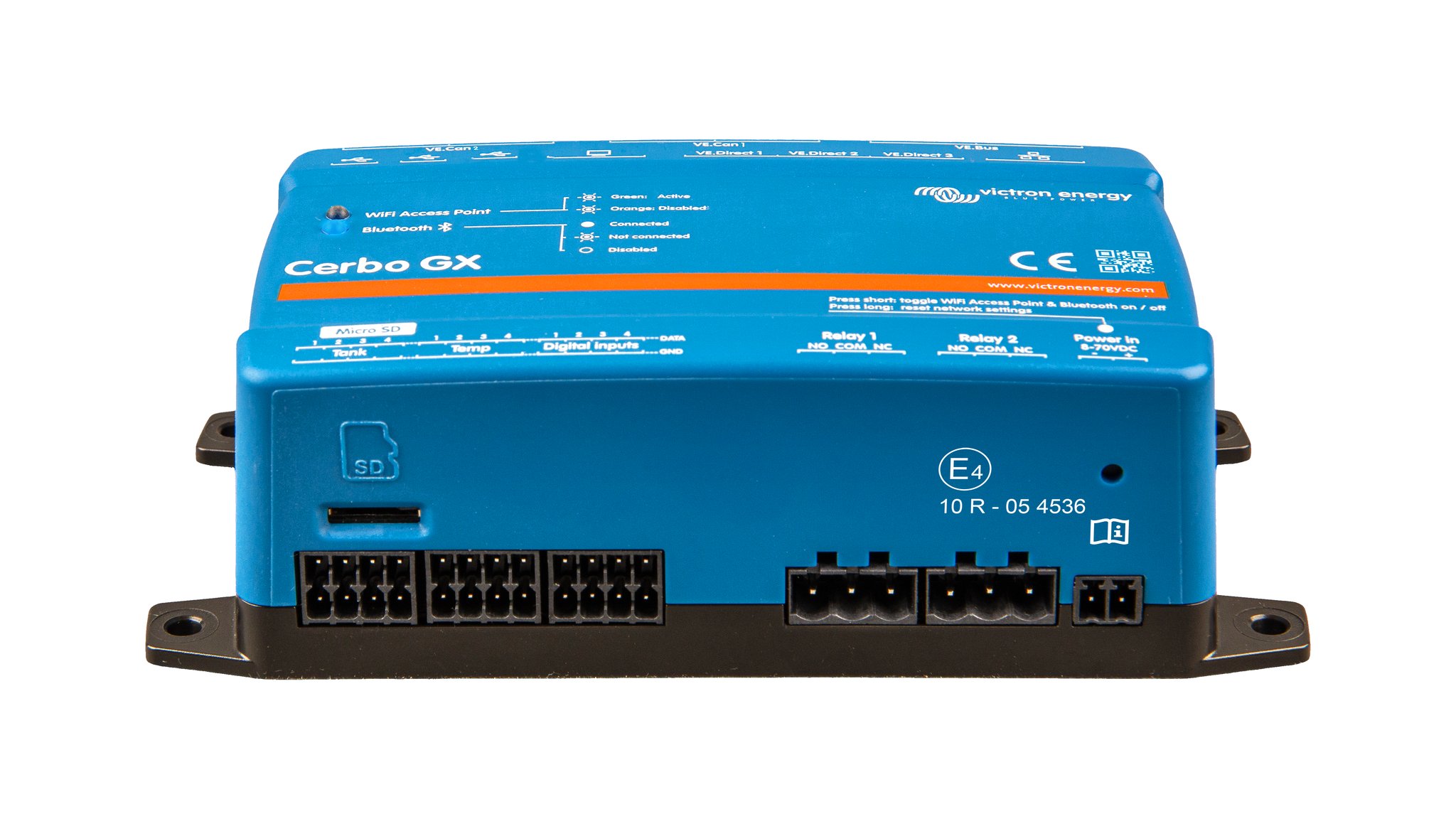
On the outside, nothing has changed. It’s the same 78 x 154 x 48 mm case, the same ports and the same 8-70 V DC supply, with no new branding. The only way to tell them apart is the part number on the rear label.
Inside, it’s a different machine. The MK2 still uses an Allwinner A20 from 2013: two 32-bit Cortex-A7 cores at 1.2 GHz with DDR3. The MK3 moves to a TI AM625, with four 64-bit Cortex-A53 cores at 1.4 GHz and 1 GB of DDR4. Ysebaert, quoting Victron, says that’s roughly 3-4x faster. On Victron’s own spec sheet, the only difference listed is the VE.Direct device limit, which goes from 15 to 25. That matters more than it sounds. Add up a few MPPTs, Orion XS units and chargers on a bigger boat and you hit 15 quickly.
There’s one catch. Early MK3 units could reboot even with free memory left. Victron says v3.81 fixes this and frees about 19 MB of RAM, with “further memory improvements in progress”. The firmware is still catching up with the hardware, so update before you commission one.
Cerbo GX vs Cerbo GX MK2 vs Cerbo GX MK3 comparison
| Cerbo GX (original) | Cerbo GX MK2 | Cerbo GX MK3 | |
|---|---|---|---|
| Part no. | BPP900450100 | BPP900450110 / BPP900451100 | BPP900451130 |
| CPU | 2x Cortex-A7 1.2 GHz (A20)ᵃ | same as originalᵃ | 4x Cortex-A53 1.4 GHz (AM625)ᵃ |
| RAM | 1 GB DDR3ᵃ | 1 GB DDR3ᵃ | 1 GB DDR4ᵃ |
| VE.Direct | 3 (max 15) | 3 (max 15) | 3 (max 25) |
| VE.Can | Yes, non-isolated | VE.Can 1 isolated + VE.Can 2 non-isolated | VE.Can 1 isolated + VE.Can 2 non-isolated |
| BMS-Can | Yes (BMS-Can only) | No separate port (use VE.Can) | No separate port (use VE.Can) |
| VE.Bus | 2x RJ45, isolated | same | same |
| USB | 2 host + 1 power-only | 3 host | 3 host (assumed, same as MK2)ᵇ |
| Ethernet | 10/100, isolated except shield | same | same |
| Digital in / relays | 4 / 2 (6 A @ 30 VDC) | same | same |
| Tank / temp inputs | 4 / 4 | 4 / 4 | 4 / 4 |
| Display | GX Touch 50/70 | GX Touch 50/70 (+Flush) | GX Touch 50/70 (+Flush) |
| Power draw @12 V | 2.8 W (3.8-4.8 W with GX Touch) | same | not stated |
| Status | From 2019 to early 2025ᶜ | From 2023/2024 | shipping since ~23 Sep 2026ᶜ |
ᵃ CPU/RAM figures from Panbo, Ysebaert and the Victron Community, not a Victron spec sheet.
ᵇ The manual lists the MK2 and MK3 together with identical ports, but its spec table doesn’t list USB.
ᶜ Community/secondary source.
Original Cerbo and MK2 port data verified against Victron’s Cerbo GX datasheet.
Upgrading to the Cerbo GX MK3
Settings don’t transfer. Victron’s VRM manual says you “will need to manually reconfigure settings on the new GX device”. There’s no supported backup/restore of settings between GX devices (GitHub request #735, no ETA).
VRM history survives. In VRM, go to Add Installation → Replace GX Device. Enter the new unit’s Portal ID and choose the old installation. Expect a short gap in the data, plus an orphan site you can delete afterwards.
MK2 ↔ MK3 is a straight swap: same ports, same footprint. (On the MK2, Victron’s datasheet notes the RJ45 sockets are rotated 180° compared with the original, which makes the cables easier to remove.)
Original Cerbo → MK2/MK3: the original has a dedicated BMS-Can port, which the newer units don’t have. A lithium BMS on BMS-Can has to move to a VE.Can port. Check the bitrate and the terminators.
Before you swap:
- Photograph every connector and write down your settings (DVCC, ESS, relays, inputs, tanks).
- Export your Node-RED flows. Note any Signal K plugins.
- Update the new unit to v3.81+ and reinstall the Large image if you use it.
- Test DVCC/BMS control, alarms and relay actions (generator start) afterwards.
Our verdict on the Cerbo GX MK3
One of our test boats runs a Quattro on 24 V lead carbon, with no CAN BMS and only a few devices. The MK2 handles that easily, so we’re keeping it. A lithium boat with several MPPTs, Orion XS units and Node-RED load management is different. That’s where the MK2 runs out of headroom.
- Buying new: get the MK3, assuming the price gap is small. It’s the same install with far more headroom.
- Happy MK1/MK2 owner: keep it.
- MK2 struggling or close to 15 VE.Direct devices: swap to the MK3, and budget an afternoon to re-enter your settings.
Sources
Official (Victron):
- Cerbo GX manual, technical specs (MK2/MK3): https://www.victronenergy.com/media/pg/Cerbo_GX/en/technical-specifications.html
- Cerbo GX / Cerbo-S GX / GX Touch datasheet: https://www.victronenergy.com/upload/documents/Datasheet-Cerbo-GX-GX-Touch-EN.pdf
- Venus OS v3.81 release notes: https://professional.victronenergy.com/news/detail/388/
- Ekrano GX technical specs: https://www.victronenergy.com/media/pg/Ekrano_GX/en/technical-specifications.html
- Ekrano GX product page: https://www.victronenergy.com/communication-centres/ekrano-gx
- VRM manual, replacing a GX device: https://www.victronenergy.com/media/pg/VRM_Portal_manual/en/replacing-a-victron-gx-device-in-vrm.html
- Backup/restore request #735: https://github.com/victronenergy/venus/issues/735
- Victron blog, METSTRADE 2019 roundup (Cerbo GX launch): https://www.victronenergy.com/blog/2019/12/05/metstrade-2019-roundup/
- Victron GX product range sheet (Cerbo GX MK2 release 2023/2024, part numbers): https://fvcomponentes.com/wp-content/uploads/2025/09/victron_gx_product_range.pdf
Secondary:
- Panbo, 2 Oct 2026: https://panbo.com/victron-unveils-faster-cerbo-gx-mk3-and-emergency-reverse-charging-for-orion-xs/
- Ysebaert (distributor), 25 Sep 2026: https://www.ysebaert.be/en/blog/hybrid-energy-5/discover-the-new-victron-cerbo-gx-mk3-the-same-cerbo-only-much-faster-79
- Victron Community MK3 thread: https://community.victronenergy.com/t/cerbo-gx-mk3-news/61536